DICEUS Agentic AI Platform for insurance operations
An operational layer that runs above the platforms you already have. It works through the policy, endorsement, renewal, premium, and document steps your specialists handle manually today, and it stops at every point where an insurance decision belongs to a person.
Book a demoWhat the platform is
An agentic AI platform is software that carries out a sequence of steps across other systems. The DICEUS Agentic AI Platform applies that to insurance operations: it reads documents and records your teams use, performs the next step, and hands the decision back to a named person when required.
It is not a core system, and it does not replace one. Your policy administration system, claims system, document repository, and finance system stay where they are, and you preserve your investment in them. The platform connects to them, moves the work between them, and leaves your specialists to handle the material insurance and regulatory judgments.
It is also not a chatbot. There is no assistant to talk to. Each agent has a defined input, action, output, and sign‑off point.
Who it is for
- Insurance carriers
- Managing general agents
- Third‑party administrators
- Captive managers
- Fronting carriers
- Program administrators
- Multinational program teams
- Insurance operations leadership
What slows insurance operations down
Most of the cost in insurance operations is not in the decisions. It is in the coordination, checking, chasing, and reconciling that surrounds them.
-
Work moves by email
Instructions go out by email and come back as attachments tracked in a spreadsheet.
-
Checking is done by reading
Someone opens every issued document and compares it against what was instructed.
-
One change becomes many
A single change at program level turns into dozens of separate local actions.
-
Status is compiled, not known
Answering “where is that program” means a specialist pulling data from several systems.
-
Exceptions surface late
Discrepancies appear at year‑end, at audit, or when the client finds them first.
-
Headcount is the only lever
Volume grows, the specialist talent pool does not, and the backlog absorbs the difference.


What each agent does
Policy alignment agent
Compares each issued policy against the instruction it was issued from.
- Input: issued policy and source instruction
- Action: compares coverage, limits, wording, dates
- Output: classified exceptions with excerpted evidence
- Approval: specialist confirms every material exception
- Scope: program and delegated‑authority policies

Issuance coordinator
Runs the issuance cycle from instruction through to the filed document.
- Input: program structure and partner map
- Action: issues instructions, tracks SLA, chases
- Output: issued documents validated for completeness
- Approval: specialist approves instructions before sending
- Scope: local offices and delegated partners
Endorsement agent
Turns one approved change into the actions each policy needs.
- Input: approved change and affected policies
- Action: generates instructions, tracks completion, compares
- Output: completion evidence and premium impact
- Approval: specialist approves interpretation and premium posting
- Scope: mid‑term changes to in‑force policies
Renewal agent
Keeps renewal status continuous instead of compiled once a week.
- Input: expiring record, exposure, claims data
- Action: collects exposure, issues instructions, tracks items
- Output: continuous renewal status and open items
- Approval: specialist approves instructions and material exceptions
- Scope: renewal cycle up to issuance
Compliance assistant
Retrieves what each jurisdiction requires and watches it for changes.
- Input: jurisdiction scope and issued documents
- Action: retrieves requirements, monitors change feeds
- Output: flagged requirements and potential exceptions
- Approval: specialist decides every compliance question
- Scope: retrieval and monitoring, not judgment
Premium reconciliation agent
Matches what was invoiced against what the program actually allocated.
- Input: invoices and the allocation record
- Action: checks currency, taxes, and fees
- Output: discrepancies classified by severity
- Approval: specialist confirms any allocation change
- Scope: allocation, invoice, and payment matching
Operations monitor
Answers the status question continuously rather than when someone asks.
- Input: output from every other agent
- Action: surfaces overdue, breaching, missing, mismatched items
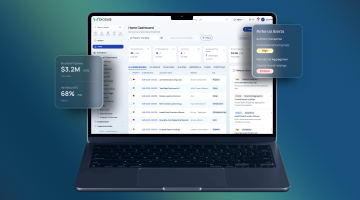
- Output: live operational picture and alerts
- Approval: specialist approves SLA and scope changes
- Scope: passive surfacing, no transactions performed
Find the right solution for your needs

Where the platform stops
The agents work across systems you already run. Each one reads from a defined set of sources, writes to a defined set of destinations, and has a list of things it is not permitted to touch. That list matters more than the capability list when your risk and audit functions review this.
What it reads
- Policies, endorsements, and certificates
- Program and instruction records
- Invoices and allocation data
- Claims management files
- Jurisdiction requirement libraries
What it writes
- Task and workflow records
- Status and exception records
- Draft instructions for approval
- Document repository entries
What it never touches
- Binding or pricing decisions
- Coverage or claims determinations
- Regulatory judgments
- Anything outside its approved scope
Who approves what
-
The agent is a user
Each agent runs under its own identity with its own permissions, not under a person’s credentials. Access is restricted to the specific records and endpoints the task needs, so an agent built for issuance cannot reach claims data.
-
Confidence has a floor
Every agent has a threshold below which it stops and escalates rather than proceeding. Ambiguous documents, unexpected formats, and values outside an expected range all route to a named person instead of being resolved by guesswork.
-
Validation before any write
Nothing reaches a system of record without passing schema, business‑rule, and permission checks first. A write that fails validation becomes an exception for review, not a partial update that someone finds later.
-
A record of every step
Each action is logged with the input it saw, the step it took, the output it produced, and the person who approved it. The log is what your internal audit and your regulator will ask for, and it is produced as a by‑product of the work rather than assembled afterwards.
-
Limits and a stop control
Volume caps and anomaly detection apply per agent. Anything unusual throttles or halts the agent rather than letting it run, and an operations lead can stop any agent without a release.
-
Tested before it touches production
Agents run against a staged environment with real‑shaped data before they are given production scope, and scope is widened deliberately rather than by default.


Three workflows end to end
Three workflows, each shown as it runs: what starts it, what the agent does, and where a person signs off before anything moves.
 Alignment
-
A policy is issued
The agent picks up the issued document as soon as it lands in the repository.
-
It is read against the instruction
Coverage, limits, sublimits, deductibles, exclusions, dates, and insured entities are compared line by line.
-
Exceptions go to a specialist
Material differences are classified by severity and routed with the evidence excerpted, for a person to confirm.
 Endorsements
-
A change is approved
The agent takes the approved change and identifies every in‑force policy it affects.
-
Instructions go out and come back
Each affected policy gets its own instruction. Completion is tracked, and issued endorsements are compared to what was asked.
-
Premium impact waits for sign‑off
Any recalculation is prepared and held. It posts only after a specialist approves it.
 Renewals
-
Exposure collection starts early
The agent requests updated exposure and claims data and tracks what has come back.
-
Open items stay visible
Outstanding documents, late issuance, and unresolved exceptions are surfaced continuously, not compiled weekly.
-
A person owns the renewal decision
The agent prepares the package. Terms, pricing, and whether to renew remain with the underwriter.
Where it fits by segment
The workflows are the same; what changes is which document is being checked against which instruction, and who signs off. Four segments where the operational shape repeats.
Carriers
- Issuance coordination across offices and partners
- Endorsement propagation on in‑force business
- Continuous operational status for leadership reviews
MGAs
- Checking bound business against delegated authority
- Submission and document intake into underwriting
- Reporting prepared from the record, not by hand
TPAs
- Intake and classification of incoming documents
- Service‑level tracking across client programs
- Exception routing to the right handler
Captive managers
- Policy and endorsement administration across entities
- Premium allocation and invoice reconciliation
- Evidence assembled for the annual review
Learn more about our insurance software for MGAs and captive insurance software.
What it connects to
- 01Policy administration systems
- 02Claims systems
- 03Underwriting workbenches
- 04Document repositories
- 05Finance and billing systems
- 06Broker and partner portals
- 07Workflow and task systems
- 08Email and structured feeds
- 09Reporting and BI environments
- 10Data warehouses
- 11Jurisdiction requirement sources
Deployment
The platform is deployed on‑premises, in the cloud, or as a hybrid of the two. The model is agreed during scoping and depends on your infrastructure, data residency, and IT requirements. Functionality and configuration options are the same whichever model you choose.
How to get started
-
01
Pick one workflow
We choose a single workflow with real volume and a clear approval point and agree what good looks like before anything is built.
-
02
Connect the sources
We establish read access to the systems and documents that workflow depends on and agree the write path and permissions with your IT and risk teams.
-
03
Run it alongside your team
The agent runs in parallel on real work. Its output is reviewed rather than applied, so you can see where it is right and where it is not.
-
04
Give it scope
Once the output holds, the agent is given production scope with its approval points in place, and the next workflow starts.
Agents, scripts, rules, and copilots
Four different things get called automation. They fail in different places, and the right one depends on how predictable the work is.
Why DICEUS
-

Insurance operations is the only domain we offer software products for
-

Integration experience with a policy administration system and insurance underwriting platform
-

Every agent has a named approval point
-

Deployment on‑premises, in the cloud, or hybrid
What it does not do
-
01
It does not underwrite
Risk selection, pricing, and terms stay with your underwriters. The agents prepare the work and hand it over; they do not decide whether to write the business or on what terms.
-
02
It does not settle claims
Coverage determinations, reserving, and settlement authority are not in scope. The agents move documents, check them against what was instructed, and route what needs a person.
-
03
It does not give regulatory judgment
The compliance assistant retrieves requirements and flags possible exceptions. Deciding what a regulator requires, and what to do about it, is a specialist decision and stays one.
-
04
It does not replace your systems
This is a layer, not a core system. If what you need is a policy administration system or a claims platform, that is a different conversation and we have both.
-
05
It is not a chatbot
There is nothing to have a conversation with. Each agent has a defined job, a defined approval point, and a log of what it did.
See one agent run against one of your own processes
Book a demo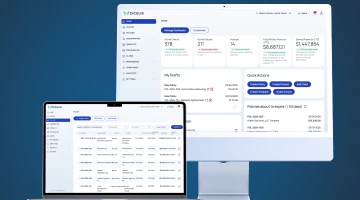
Frequently asked questions
Do we have to replace our policy administration system?
No. The platform runs above whatever you have and connects to it. Replacing a core system is a separate project, and if that is what you need we build those too.
What controls do we get before an agent writes to a core system?
Each agent runs under its own identity with scoped permissions, validates every write against your business rules first, stops below a confidence threshold, and logs each action with the approver. Volume limits and a stop control apply per agent.
How long does it take to get one workflow live?
Implementation runs from four weeks to six or nine months, depending on the number of functionalities. Exact timelines are agreed upfront. A single workflow at the shorter end of that range is the usual starting point.
Can an agent make an underwriting or claims decision?
No. Risk selection, pricing, terms, coverage determinations, and settlement stay with your people. The agents prepare and check the work around those decisions and stop where the decision begins.
How is this different from the RPA we already run?
RPA follows a fixed path and breaks when a screen or a format changes. An agent handles variation, carries a task through several steps across systems, and routes what it cannot resolve to a person.
What happens when an agent is not sure?
It stops. Anything below its confidence threshold, in an unexpected format, or outside an expected range is escalated to a named person with the evidence attached, rather than being resolved by guesswork.
Can we start with one process rather than all of them?
Yes, and that is the recommended way in. One workflow with real volume, run alongside your team so its output is reviewed rather than applied, then given production scope once it holds.

